Organizations
An organization is a shared namespace for a team: repositories, members, roles and policy in one
place. This page covers creating one, what each role can do, managing members, and how
organization repositories behave from huggingface_hub.
Users and organizations share one namespace
There is a single namespace space. admin (a user) and acme (an organization) are names of the
same kind, and both answer at /{name} in the web UI. A repository owned by an organization is
just {org}/{name}:
admin/imdb-reviews        a repository in a user namespace
acme/sentiment-base    a repository in an organization namespace
Because of that, nothing on the client side has to know the difference. huggingface_hub treats
acme/sentiment-base exactly like any other repository id — the same create_repo, the same
upload_file, the same hf_hub_download, the same git clone.
One consequence worth knowing up front: a name can only be claimed once. If acme is already a
user account, it cannot also be an organization.
Create an organization
From the web UI, open the account menu and choose New organization (http://localhost:3000/orgs/new). You provide:
- Organization ID — the namespace. It appears in every URL and repository name, and it can
never be changed. Same rules as a repository name: 1–96 characters of letters, digits, dot,
dash or underscore, starting with a letter or digit, not ending in
.git. - Display name — optional, shown instead of the ID on the organization page, editable at any time.
- Description — optional.
You become the organization's first member and its admin.
Note
Who may create organizations is an instance-wide setting: TF_ORG_CREATION is anyone by
default, and admin restricts creation to site administrators. See
Configuration.
Roles
Every member holds exactly one of three roles in the organization. They are ordered, so each one includes everything below it.
| Operation | Non-member | read |
write |
admin |
|---|---|---|---|---|
| View the organization page and its repository list | Yes | Yes | Yes | Yes |
| Read, clone, download, browse experiments | Yes | Yes | Yes | Yes |
| View the member list | Only if the policy is public | Yes | Yes | Yes |
| View the organization's storage usage | No | Yes | Yes | Yes |
| Create a repository in the namespace | No | No | Yes | Yes |
| Push, commit, edit in the browser, ingest experiment metrics | No | No | Yes | Yes |
| Accept a repository transfer into the organization | No | No | Yes | Yes |
| Delete a repository | No | No | No | Yes |
| Archive or unarchive a repository | No | No | No | Yes |
| Transfer a repository out of the organization | No | No | No | Yes |
| Manage webhooks | No | No | No | Yes |
| Add or remove members, change roles | No | No | No | Yes |
| Edit the profile and policy | No | No | No | Yes |
| View the audit log | No | No | No | Yes |
| Delete the organization | No | No | No | Yes |
| Leave the organization | — | Yes | Yes | Yes, unless last admin |
Site administrators hold admin over every namespace without being members: they never appear in
a member list, and the organization never shows up in their whoami()["orgs"].
There is no repository visibility
thinkingface deliberately has no public/private distinction for repositories. Every repository on the instance is readable by everyone who can reach the instance, including signed-out visitors. Roles govern writing, and membership itself — not read access. If you need to keep data from being read, keep it off the instance or restrict access to the instance as a whole.
huggingface_hub still accepts private=True / visibility="private" on create_repo so
existing code does not break; the value is decoded and ignored.
What read actually grants, then, is membership: the member list, the organization's storage
usage, and being listed as part of the team. write adds creating and pushing. admin adds
everything destructive or administrative.
Two things write deliberately does not include: deleting a repository, and managing
webhooks. A webhook carries the namespace's secrets to an external URL, and deleting is not
reversible — both are administrative acts rather than content changes.
Manage members
Members are managed at Settings → Members on the organization
(/orgs/acme/settings/members).
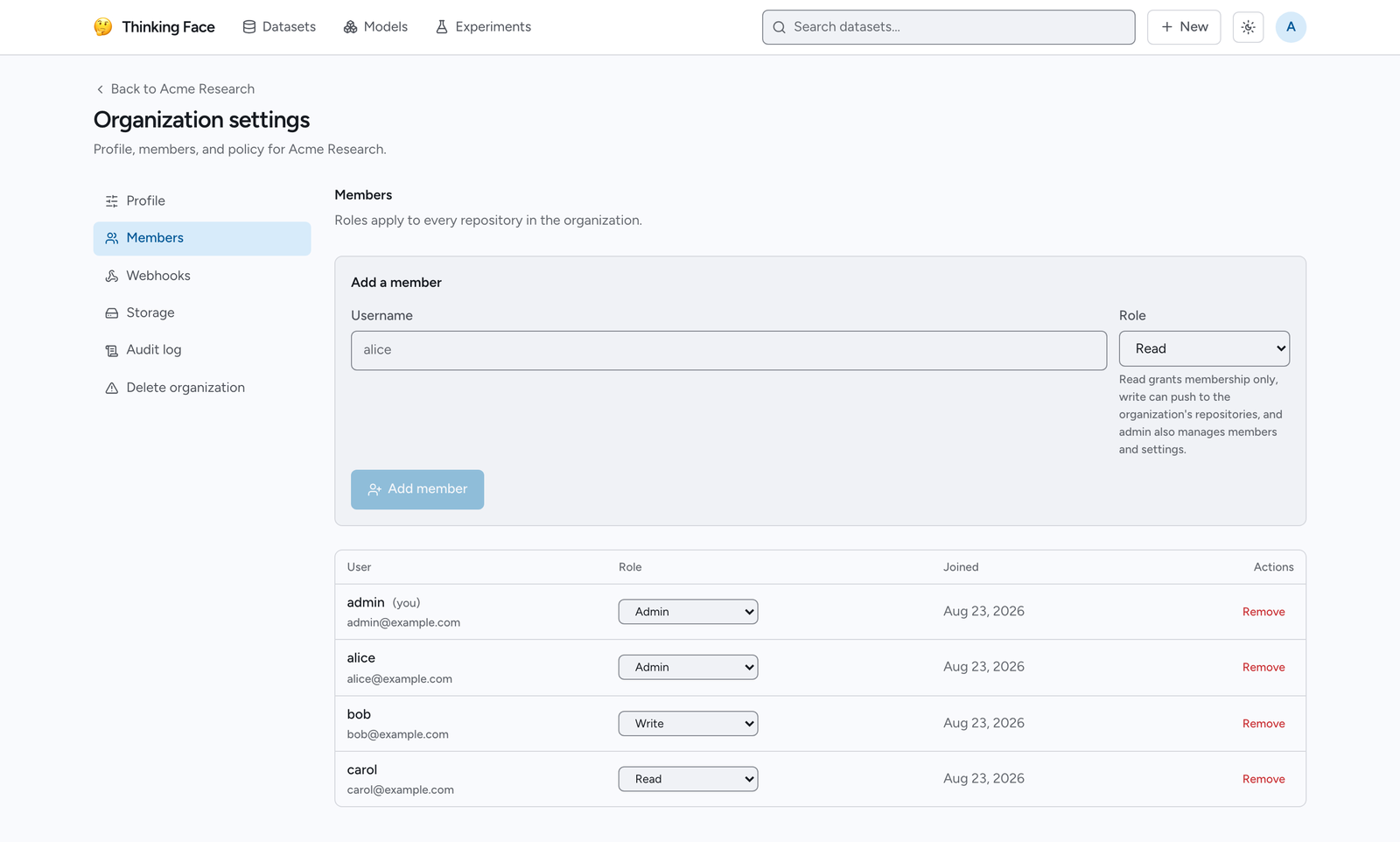
- Add a member by username. They must already have an account on the instance — there are no
email invitations. The default role is
readif you do not choose one. - Change a role from the row's role control.
- Remove a member from the row.
- Leave an organization by removing yourself; it is the same operation.
An organization always keeps at least one admin. Removing the last admin, or demoting them, is refused with a message telling you to appoint another admin first.
Who can see the member list
The organization's Policy setting controls this:
members_visibility |
Who may list members |
|---|---|
members (default) |
Members of the organization only |
public |
Anyone, including signed-out visitors |
Non-members reading a public roster see the usernames without email addresses.
Work with organization repositories from Python
Nothing changes except the namespace segment. Set your endpoint and token as usual, then:
import os
from huggingface_hub import HfApi

os.environ["HF_ENDPOINT"] = "http://localhost:8080"
os.environ["HF_TOKEN"] = "tf_xxxxxxxxxxxx"
os.environ["HF_HUB_DISABLE_XET"] = "1"

api = HfApi()

# Create under the organization: the namespace is just the first segment.
api.create_repo("acme/sentiment-base", repo_type="model", exist_ok=True)

api.upload_file(
    path_or_fileobj="config.json",
    path_in_repo="config.json",
    repo_id="acme/sentiment-base",
    repo_type="model",
)
Your organizations and your role in each come back from whoami():
for org in api.whoami()["orgs"]:
    print(org["name"], org["roleInOrg"])
acme admin
And the roster:
for member in api.list_organization_members("acme"):
    print(member.username)
list_organization_members follows the same visibility rule as the web UI: members always see it,
everyone else only when the policy is public.
A read member pushing to an organization repository gets an HTTP 403. Promote them to write
and the same push succeeds — nothing else needs to change on their side, and their token stays the
same.
Organization settings
The settings screens live at /orgs/{org}/settings and are admin-only — a member without the
admin role gets an explicit "admins only" message rather than a 404, because the organization's
existence is public information.
| Screen | What it does |
|---|---|
| Profile | Display name, description, website and avatar URL (a link to an image hosted elsewhere; there are no uploads). The namespace name is fixed. |
| Policy | members_visibility, described above. |
| Members | Add, promote, demote and remove, as described above. |
| Webhooks | HTTP endpoints notified about events in the organization's repositories — pushes, repository lifecycle, transfers and experiment run status. All ten events, the payloads, signature verification and the retry policy are in Webhooks. |
| Storage | The LFS bytes the organization's repositories hold in object storage, broken down by repository. |
| Audit log | Administrative changes and repository lifecycle events, newest first. |
| Delete organization | The danger zone, described below. |
Members without the admin role can still see the organization's storage usage: their own
Storage usage page (/settings/storage) lists every namespace they belong to. Usage does
not go back down when a file is merely deleted or replaced — once a commit has named an
LFS object, thinkingface keeps it retrievable at any historical revision for as long as the
repository exists, so only an object no commit ever named (an interrupted upload) is ever
reclaimed. See TF_DEFAULT_STORAGE_QUOTA_BYTES in
Configuration for the mechanics, and how to actually free
the bytes.
The audit log
Each entry records when it happened, who did it, what was done and to what. The recorded actions are:
org.created            org.updated
member.added           member.role_changed      member.removed      member.left
repo.created           repo.deleted
repo.transferred_in    repo.transferred_out
webhook.created        webhook.updated          webhook.deleted
Deleting the organization is not recorded in its own log — the log is scoped to the namespace and is removed with it. That event goes to the server's process log instead.
Deleting an organization
Deleting removes the organization's members, webhooks and audit log, and frees the name for reuse. It never deletes repositories, and for that reason it is refused while any repository still belongs to the organization. Delete or transfer them first.
Transfer a repository between namespaces
Repositories move between namespaces — from your personal namespace into an organization, between two organizations, or back out. Open the repository's Settings tab and use Transfer ownership.
Renaming a repository within the same namespace has its own Rename section above Transfer ownership on the same Settings page, with no typed confirmation required. The Transfer ownership form also still has an optional "new name" field, which renames the repository as part of the transfer — useful when the destination namespace already has something with the same name. Use the dedicated Rename section for a same-namespace rename such as fixing a typo, since it skips the typed confirmation a transfer requires. Either way, a rename leaves a redirect behind, exactly like a transfer, so old URLs, clone remotes and model-card references keep resolving.
Git history, LFS objects and download counts carry over unchanged, and no bytes move in object storage — object keys are derived from content, not from the repository name.
Who may do it:
- From the source you need admin over the source namespace. In an organization this means the
adminrole, so awritemember cannot carry a repository out from under the team. In a personal namespace the owner is the only admin, so nothing changes there. - At the destination, if you could already create a repository there (
writeor above), the move completes immediately. Otherwise a transfer request is filed and waits for the destination to accept it.
Pending transfers, incoming and outgoing, are listed at Repository transfers
(/settings/transfers), where the destination accepts or rejects and the originator can cancel.
A request that nobody answers expires after 7 days.
From Python the same operation is move_repo:
api.move_repo(from_id="admin/sentiment-base", to_id="acme/sentiment-base", repo_type="model")
Tip
The old repository id keeps working after a move — reads and writes alike are redirected, and
git clone / git pull follow the redirect. You do not have to update every script the day
you transfer something.
An archived repository cannot be transferred; unarchive it first.
Related pages
- Core Concepts — namespaces, repositories and revisions
- Uploading Files — pushing to a repository once you have
write - Authentication — tokens and their read/write scope
- Tracking Experiments — sharing an experiment repository across a team
- Configuration —
TF_ORG_CREATIONand the other instance settings