Inspecting Models
thinkingface can show you what's inside a model checkpoint file — its tensors, shapes, and dtypes — without downloading the weights. This page covers which formats are understood, what the inspector reads, and what it surfaces in the web UI.
Which formats are understood
The inspector recognizes a checkpoint by its file extension:
| Extension | Format |
|---|---|
.safetensors |
safetensors |
.bin, .pt, .pth, .ckpt |
PyTorch (torch.save) |
Any other extension gets the plain file preview instead — the inspector doesn't attempt to
guess a format from content. It works on a checkpoint file in either a model or a dataset
repository; it isn't limited to files under /models.
The weights are never downloaded
Both formats keep their structure in a small header at a known position: a safetensors file
opens with a JSON header naming every tensor, and a PyTorch checkpoint is a zip archive whose
data.pkl member holds the pickled object graph describing it. Reading either means a
handful of ranged reads over the file — regardless of whether it's megabytes or hundreds of
gigabytes — so inspecting a checkpoint costs about as much as opening a small file. The tensor
data itself is never fetched.
Results are cached by content hash, so re-opening the same file (even under a different revision or path, if the bytes are identical) answers instantly.
Open the inspector
Open a checkpoint file's blob page (from the file tree, or /blob/{revision}/{path}) and the
inspector loads in place of a text preview:
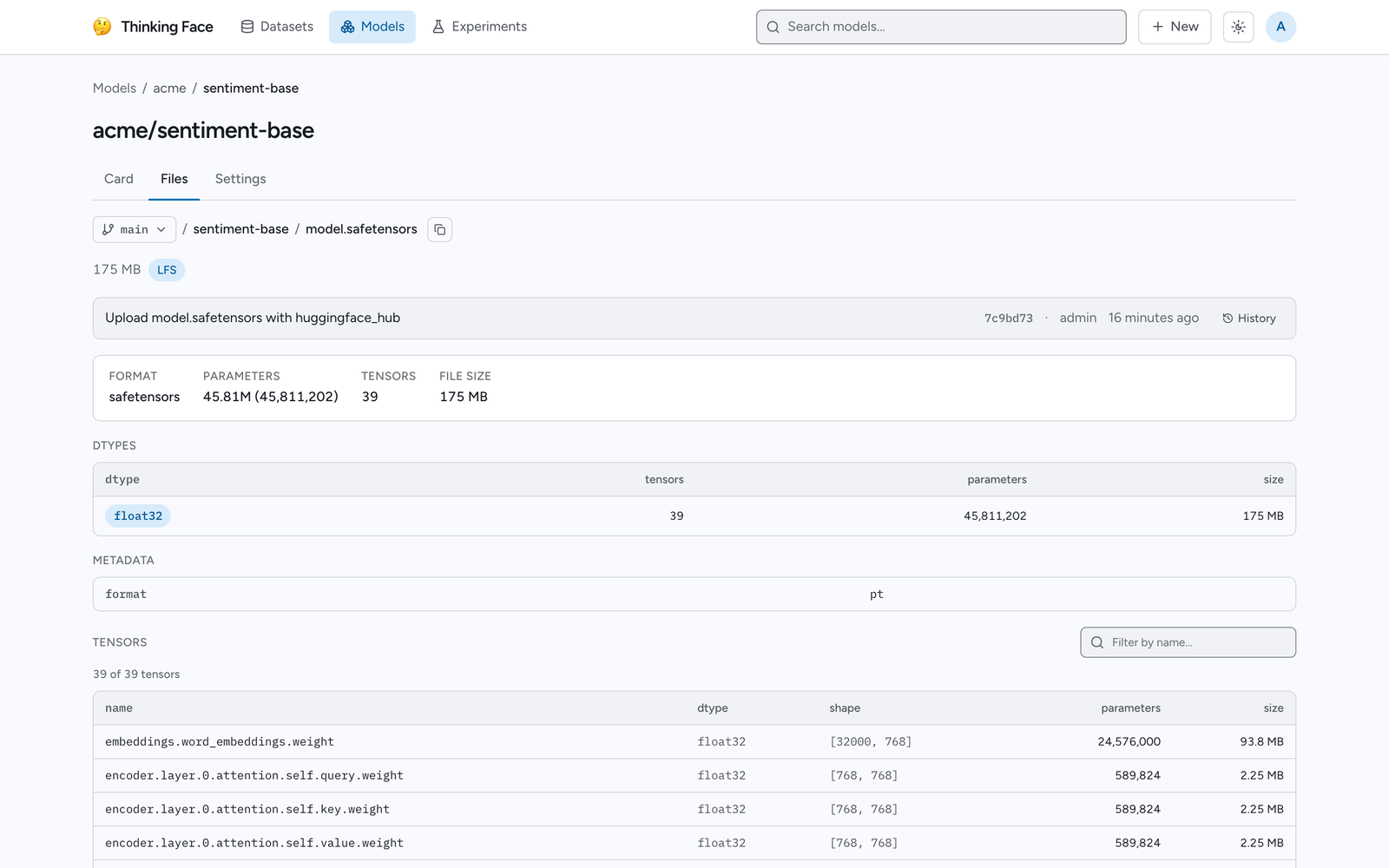
What you see
A summary row gives the Format (safetensors or PyTorch), total Parameters, total Tensors, and the file's File size.
Below it, when the checkpoint has more than one dtype, a Dtypes table breaks the tensors down by dtype, with columns for the number of tensors, the number of parameters, and the total size each dtype accounts for — the largest contributor first.
If the file carries its own metadata — a safetensors __metadata__ block, or scalar entries
saved alongside the weights in a PyTorch checkpoint (things like epoch or global_step) — a
Metadata table lists those key/value pairs.
A Tensors table lists every tensor by name, dtype, shape (as [dim1, dim2, ...]),
parameter count, and size, with a name filter above it. On a checkpoint with a very large
number of tensors, the list is capped (currently at 4096 entries) with a note that the
totals in the summary row still cover every tensor, shown or not — only the listing itself
is truncated.
Any problem the parser recovered from rather than failing on — a structure it only partially understood — is listed as a warning beneath the tensor table instead of hiding the rest of the inspection.
If the inspection request fails outright (for instance, a file that isn't the format its extension claims), the panel shows an error with a fallback download link instead of the inspector.
Lineage and model versioning
A model repository's card can declare where its weights came from and what supersedes them, independent of the metadata read from the checkpoint file itself. On the Card tab of a repository page, a Lineage section lists:
- Base model — the model this one was derived from, and the relation to it (fine-tune, adapter, quantization, or merge).
- Trained on / Evaluated on — the dataset repositories used for training and for evaluation.
- Training run — the experiment run that produced this checkpoint, when logged.
When a card declares a new_version, a banner at the top of the repository page links to the
latest repository in that succession chain, so landing on an old version points you forward
rather than leaving you on a superseded one. A reference the server can't resolve — a typo, or
a repository not yet pushed — is shown as plain text with a note instead of a broken link.
These fields come from README.md's YAML front matter, not from the checkpoint's own header,
so they appear next to the file listing on the Card tab rather than inside the inspector
described above.