Tracking Experiments
thinkingface records training runs the way trackio, Weights & Biases or MLflow do — projects, runs, hyperparameters, metric series — and charts them in the web UI. This page covers how runs get in, what you write in your training script, and what the UI gives back.
The important difference from a hosted tracker: there is no separate experiment database you have
to trust. Every run ends up as a Parquet file inside an ordinary dataset repository, so the data
is git-versioned, clonable, and readable with DuckDB or gcloud storage without going through
thinkingface at all.
The data model
| Term | What it is |
|---|---|
| experiment repository | A dataset repository holding the Parquet that experiment data lives in. Conventionally {you}/trackio-metrics. |
| project | One tracked body of work inside that repository — usually one model or one task. |
| run | A single training attempt within a project. Has a name, a status, a config and metrics. |
| config | The run's hyperparameters, a JSON object, recorded once when the run starts. |
| metric series | The (step, value) points logged for one metric name in one run. |
| summary | The last value seen for each metric, plus the smallest and largest value it reached over the run. Shown in the run list and on the run page. |
| metric goal | Per project: whether lower or higher is better for a metric. Drives the "best run" markers and best: sorting. |
| notes | Per project: a Markdown notebook committed to the repository as {project}/NOTES.md. |
A run's stored status is running, finished or failed. A fourth status, stale, is derived
when the run is read: a run still recorded as running that has not been heard from for longer
than its staleness window (see Detect crashed runs) is reported as
stale, and goes straight back to running if it logs again.
A dataset repository is treated as an experiment repository when any of these is true:
- it contains a
metrics.parquet(at the repository root or in any directory), or - its README card carries a
trackioorexperimenttag, or - its README card sets
thinkingface_experiment: true.
Flagged repositories get an Experiments tab on the repository page, and appear in the Experiments section of the top navigation.
Two ways to get runs in
Both paths write to the same place. Pick per project; you do not have to pick for the whole instance.
| Aspect | Batch sync (route A) | Real-time ingest (route B) |
|---|---|---|
| What you import | trackio itself |
thinkingface.trackio |
| Code changes | None — only HF_ENDPOINT |
One import line |
| How data arrives | trackio's own Parquet sync pushes to the dataset repository | Points POST to the server, buffered, then flushed to the same Parquet |
| Chart latency | Whatever trackio's sync interval is | Seconds |
| Where the truth lives | Parquet in the dataset repository | Parquet in the dataset repository |
Use route A when you already run trackio and do not want to touch the script. Use route B when you want to watch a curve while the job is running.
Route A — trackio's Parquet sync
Point trackio's Hugging Face client at your instance and let its dataset sync run as it normally does:
export HF_ENDPOINT=http://localhost:8080
export HF_TOKEN=tf_xxxxxxxxxxxx
export HF_HUB_DISABLE_XET=1
Every push to the dataset repository triggers indexing, which scans the Parquet files and rebuilds the run index. The layouts that are recognised are:
metrics.parquet              + aux/configs.parquet          -> project named after the repository
{project}/metrics.parquet    + {project}/aux/configs.parquet
{project}.parquet            + {project}_configs.parquet
{project}_system.parquet is picked up as machine telemetry for that project, but never creates a
project of its own — a project without a metrics file is not a project. The reader looks for a run
column named run_name, run or run_id, a step column named step, _step or global_step,
and a timestamp column named timestamp, _timestamp or created_at. Every other column is
treated as a metric.
Route B — the thinkingface.trackio shim
The thinkingface Python package ships a shim with the same init / log / finish surface as
trackio (and, by extension, wandb), which posts points straight to the server instead of buffering
to local SQLite.
Install it from a checkout of the repository:
pip install -e clients/python
Configure it with environment variables:
| Variable | Meaning |
|---|---|
THINKINGFACE_ENDPOINT |
Base URL of the server. Defaults to http://localhost:8080. |
THINKINGFACE_TOKEN |
Your access token (tf_...). Needs write scope. |
THINKINGFACE_REPO |
Target dataset repository, namespace/name. Defaults to {your username}/trackio-metrics. |
THINKINGFACE_META |
Set to off to skip the automatic environment snapshot. |
THINKINGFACE_SYSTEM_METRICS |
Set to off to skip GPU/CPU/memory telemetry. |
THINKINGFACE_MODE |
online (default) or offline, which writes the run to disk instead of the network. See Offline runs and tf experiments sync. |
THINKINGFACE_OFFLINE_DIR |
Where offline runs, and points the online mode could not deliver, are written. Defaults to ./thinkingface-offline. |
THINKINGFACE_HEARTBEAT_SECS |
How often the run promises to check in, in seconds. Defaults to 30, at most 3600; 0 turns heartbeats off. See Detect crashed runs. |
THINKINGFACE_ARTIFACT_INTERVAL |
Seconds between background commits of staged artifacts, images and tables. Defaults to 60; 0 holds them until save() / finish(). |
Warning
The target dataset repository must already exist. Ingest writes into a repository you have
write access to; it does not create one for you. Create it once with
HfApi().create_repo("admin/trackio-metrics", repo_type="dataset", exist_ok=True) or from
the web UI.
Log metrics from a training loop
A complete, working script:
import os

os.environ["THINKINGFACE_ENDPOINT"] = "http://localhost:8080"
os.environ["THINKINGFACE_TOKEN"] = "tf_xxxxxxxxxxxx"
os.environ["THINKINGFACE_REPO"] = "admin/trackio-metrics"

from thinkingface import trackio

run = trackio.init(
    project="sentiment-finetune",
    name="baseline",
    config={"lr": 3e-5, "batch_size": 32, "epochs": 3},
)

for step, batch in enumerate(loader):
    loss = train_step(batch)
    trackio.log({"train/loss": loss}, step=step)

    if step % 500 == 0:
        trackio.log({"eval/accuracy": evaluate(model)}, step=step)

trackio.finish()
log() takes a dict of metric name to number, plus an optional step. Omitting step advances
the run's own counter by one. A metric name may be anything without control characters, up to 256
bytes; slashes are conventional for grouping (train/loss, eval/accuracy) and are fine.
Points are buffered in the process and flushed every 5 seconds or every 100 points, whichever
comes first, and always on process exit. A network failure never raises into your training
loop — it is reported as a warning and the points are kept for the next attempt. The one
exception is resume="must" (below), which cannot be honoured without reaching the server.
The server-side ingest API this shim talks to has its own limits, which matter mostly if you
are logging unusually large or unusually varied batches: a single ingest request may carry at
most 10,000 points, and a run may carry at most 1,000 distinct metric names over its lifetime
(every metric name a run has ever logged is kept, so this is a lifetime count, not a per-batch
one). Neither is something the normal log() usage above comes close to.
If your script already imports trackio, switching to the real-time path is one line:
import thinkingface.trackio as trackio # instead of `import trackio`
What config accepts
config may be a dict, an argparse.Namespace or a dataclass instance, so
trackio.init(project="mnist", config=parser.parse_args()) works as is. Values JSON has no
spelling for are converted when they are sent, instead of costing the run its whole config:
| Value | Stored as |
|---|---|
pathlib.Path |
its string |
enum.Enum |
its .value (its name if the value itself is not encodable) |
dataclass / argparse.Namespace |
a nested object of its fields |
| numpy scalar / array | a number / a list (an array over 1,000 elements becomes a short ndarray(shape=..., dtype=...) string) |
datetime / date |
ISO 8601 |
set / tuple |
a list |
| a dict key that is not a string | its str() |
NaN / inf / -inf |
the strings "nan" / "inf" / "-inf" |
| anything else | str(value), with one warning per run naming the keys |
run.config itself keeps your original objects; only what is sent is converted. The client never
imports numpy to do this.
A metric value, by contrast, must be a number. A metric whose value is NaN or ±inf is dropped
from its point (with one warning per run) and the rest of the point is sent as usual, so a
diverging loss shows up as a gap in the chart rather than stopping the run's logging.
Detect crashed runs
A training job killed by the OOM killer or a lost host never gets to call finish(), so without
help its run would sit in the list as running forever. The shim therefore declares a heartbeat:
every batch tells the server how often to expect news from the run (THINKINGFACE_HEARTBEAT_SECS,
30 seconds by default), and a run that has sent nothing for that long — a slow evaluation, a long
checkpoint write — posts an empty batch purely as a liveness ping.
The server reports a running run as stale once it has been silent for four heartbeats or two
minutes, whichever is longer. With the default heartbeat, a crashed run turns stale about two
minutes after its last word; a run that is merely quiet keeps pinging and never does. Runs logged
without a heartbeat (older clients, or runs that come in through route A) keep a 30-minute window.
The pings come from the shim's background flush thread, so a long training step does not make a
run stale by itself. stale is not stored either: a run that logs again is running again. Set
THINKINGFACE_HEARTBEAT_SECS=0 to turn off both the declaration and the pings.
Resume an interrupted run
On a preemptible VM a job gets killed and restarted as a matter of course. resume= decides what
happens when the project already has a run with the name you passed:
resume= |
Behaviour |
|---|---|
"never" (default) |
Never writes into an existing run. A taken name gets a -1 / -2 suffix and a warning, so the restart logs its own curve. |
"allow" (or True) |
Continues the existing run if there is one, otherwise starts it. |
"must" |
Continues the existing run, and raises RuntimeError if it does not exist. |
run = trackio.init(project="sentiment-finetune", name="baseline", resume="allow",
                   config={"lr": 3e-5})

for step in range(run.step, 100_000):
    trackio.log({"train/loss": train_step()}, step=step)
Continuing a run means the step counter picks up from the server's recorded last_step + 1
(exposed as run.step, which is what the loop above starts from), the status goes back to
running on the first flush, and the two configs are merged — keys only the previous attempt set
survive, a conflicting value from the running code wins, and the differences are recorded under
the reserved _resume config key so a learning rate that changed between attempts stays visible.
If the checkpoint you restarted from is a few steps behind, the recomputed values replace the dead attempt's at those steps on the chart. Both are kept in the Parquet; the chart draws the later one.
Group runs into a sweep
group= names the sweep a run belongs to and job_type= the role it plays in it, spelled the way
wandb spells them:
trackio.init(project="sentiment-finetune", name=f"lr-{lr}", group="lr-sweep",
             job_type="train", config={"lr": lr})
Runs sharing a group collapse into one foldable row in the run table and can be compared axis-by-axis in the parallel-coordinates view. A run without a group is listed flat.
trackio.init() also accepts and ignores any other keyword argument, so a call site written
against wandb or upstream trackio (tags=, for instance) doesn't raise just because this shim
doesn't support that option — but each ignored argument gets its own warning naming it, so an
option you expected to take effect doesn't silently do nothing.
Attach artifacts to a run
trackio.log_artifact(path, name=None) attaches a file — or a whole directory — to the current
run:
trackio.log_artifact("out/confusion_matrix.png")             # -> {project}/artifacts/{run}/confusion_matrix.png
trackio.log_artifact("out/eval.json", name="eval/raw.json")  # -> .../artifacts/{run}/eval/raw.json
trackio.log_artifact("out/samples/")                         # the whole directory, layout preserved
There is no separate artifact store. The files are committed into the run's own dataset
repository under {project}/artifacts/{run}/, through the same upload path huggingface_hub
uses — so they are git-versioned, come down with git clone, and go over LFS automatically once
they are large enough for the repository's .gitattributes. See
Downloading Files for how to get them back out.
Artifacts are committed in batches while the run is going: everything staged is committed together
in the background every THINKINGFACE_ARTIFACT_INTERVAL seconds (60 by default) when anything is
pending, trackio.save() commits right away, and finish() commits the rest. A run that saves
twenty plots a minute therefore makes one commit a minute, and a run that crashes keeps every
artifact committed before it died. A path that does not exist, a name containing .., or the
reserved name metrics.parquet produces a warning, never an exception.
A directory attached this way has limits, and blowing past one of them means none of that call's files upload, not a truncated subset:
- 500 files per
log_artifact()call. Past that, the call warns and stages nothing at all — it's an all-or-nothing refusal, not a truncation. Log the files you need individually, or push a model repository instead of attaching a large checkpoint directory this way. - A symlink to a file is followed and uploaded like any other file. A symlink to a directory is not descended into, and a dangling symlink resolves to neither — both are skipped, with a warning naming them.
- An empty directory is a warning, not an empty no-op upload — there is nothing to stage, so the call fails the same way a directory over the 500-file limit does.
Log images and tables
trackio.Image and trackio.Table can be logged like any metric value — sample generations, a
confusion matrix, a table of predictions at a checkpoint. They are not metrics: each is written to
a file and committed as an artifact of the run, named after its key and step, and the point itself
carries no value for that key.
trackio.log({"samples": trackio.Image("out/grid.png"), "train/loss": 0.4}, step=100)
# -> {project}/artifacts/{run}/media/samples/step_00000100.png

trackio.log({"preds": trackio.Table(columns=["text", "label"], data=rows)}, step=100)
# -> {project}/artifacts/{run}/tables/preds/step_00000100.parquet

trackio.save()  # optional: commit what is staged now instead of at the next interval
Image(value, caption=None)takes a path to an image file, a PIL image, or an HxW / HxWxC numpy array (uint8, or floats in[0, 1]). A PNG file is committed as is; anything else is encoded with Pillow, which is optional — without it, arrays and PIL images are skipped with one warning, and a non-PNG file is committed in its own format.Table(dataframe=None, columns=None, data=None)takes a pandas DataFrame, apyarrow.Table, or rows (lists matchingcolumns, or dicts). It is written as Parquet with pyarrow (or pandas); with neither installed, the table is skipped with a warning.
Both go through the same batched, background commits as log_artifact(), so they appear under the
run's Artifacts on the run page within about a minute. A logged table is an ordinary Parquet
file in the repository: open it from the artifact list or the file tree and the
dataset viewer shows it as a table, with the SQL console available for
querying it.
Link the model a run produced
trackio.log_model("ns/name", revision=None) records that this run built that model. With no
revision, the model repository's current HEAD is resolved — which is what you want immediately
after pushing it:
api.upload_folder(repo_id="acme/sentiment-base", folder_path="out/checkpoint")
trackio.log_model("acme/sentiment-base")
The link is stored as a run annotation rather than as a config value or a README edit, so re-indexing the project cannot lose it. It shows up on both ends: the run page lists the model under Models produced, and the model's lineage view links back to the run. A model that does not exist on the server is still recorded, and shown with a warning rather than dropped.
Automatic environment snapshot
trackio.init() collects a best-effort snapshot of the run's environment and merges it into
config under the reserved _meta key. This is sent to your server and stored with the run,
the same as anything else in config:
_meta.git.commit/.branch/.dirty— state of the git repository the script runs from_meta.cmdline—sys.argv, with values of secret-looking flags (--token,--password,--api-key,--secret,--auth,--credentialand variants) replaced with***_meta.python/_meta.platform/_meta.hostname_meta.gpu.name/.count/.cuda— read viatorchif installed, elsenvidia-smi_meta.requirements_sha256— a hash of the sorted installed package name/version pairs, so two runs can be compared for "same environment or not" without storing the full list
Anything that cannot be determined is silently dropped, and init() never raises because of it.
The run page renders this under Run environment. Set THINKINGFACE_META=off to turn the whole
collection off. _meta is a reserved config key — do not use it for your own values.
System metrics
Every active run also samples GPU, CPU and memory usage roughly every 10 seconds and logs it under
system/-prefixed keys (system/gpu.0.util, system/cpu.percent, and so on). These get their own
System metrics tab in the chart area, so they never crowd out the metrics your script logs.
Telemetry is best-effort: a machine with no GPU and no psutil simply logs nothing. Set
THINKINGFACE_SYSTEM_METRICS=off to disable it.
Whether it counts toward the run's point count and last step depends on which route logged it (see Two ways to get runs in above):
- Route A (trackio writing its own Parquet, indexed by the server) keeps system telemetry
entirely out of
num_points,last_stepand the run's start time — it's sampled on a wall-clock timer of its own, so counting it would make "how many points did this run log" and "what step is it on" depend on how long the machine happened to be up. - Route B (the
thinkingface.trackioshim) does not make that distinction: a system-metric sample goes through the same buffer and the same ingest request as any other logged point, so it counts towardnum_pointsexactly like a metric you logged yourself (it's logged at the current step without advancing it, so it rarely moveslast_stepon its own). Eachsystem/-prefixed key also counts toward the 1,000-distinct-metric-names ceiling mentioned above, though that set is small and fixed, so it never gets close to it by itself.
Framework integrations
thinkingface.trackio.integrations provides autolog hooks for two training loops, so you do not
have to sprinkle trackio.log(...) through code you did not write. Both underlying libraries are
optional dependencies — importing the module works with neither installed; only instantiating the
class needs the matching library.
For transformers.Trainer, ThinkingFaceCallback opens a run at on_train_begin, forwards every
on_log call as metrics using state.global_step, closes the run at on_train_end, and records
the TrainingArguments under config["_args"]:
from thinkingface.trackio.integrations import ThinkingFaceCallback
from transformers import Trainer, TrainingArguments

trainer = Trainer(
    model=model,
    args=TrainingArguments(output_dir="out", report_to=[]),
    callbacks=[ThinkingFaceCallback(project="sentiment-finetune", config={"notes": "baseline"})],
)
trainer.train()
For PyTorch Lightning, ThinkingFaceLightningLogger implements Lightning's Logger interface.
The run is created lazily on the first log_hyperparams / log_metrics call, so hyperparameters
passed before training starts are folded into the run's initial config:
import lightning as pl
from thinkingface.trackio.integrations import ThinkingFaceLightningLogger

trainer = pl.Trainer(logger=ThinkingFaceLightningLogger(project="sentiment-finetune"))
trainer.fit(model)
Install the extras with pip install "thinkingface[transformers]" or
pip install "thinkingface[lightning]".
Offline runs and tf experiments sync
Some machines cannot reach your server while they train: a rented GPU box on vast.ai or RunPod
behind NAT, a cluster node with no route to the office network, a laptop on a plane. The shim can
record a run to disk there and have it uploaded later by the tf CLI, from that machine or from
anywhere else.
Set THINKINGFACE_MODE=offline (or pass mode="offline" to trackio.init()) and the shim makes no
network request at all — not even to look up your username — and writes the run to a directory
instead:
thinkingface-offline/20260927T101500-mnist-baseline-1a2b3c4d/
    run.jsonl         # init / log / artifact / model / finish records, one per line
    artifacts/        # copies of log_artifact files, images and tables
    sync-state.json   # written by tf experiments sync, never by the shim
Everything else behaves as it does online: points (system metrics included) are written every 5
seconds or 100 points, log_artifact() copies the file in right away, log_model() records the
revision you pass, and finish() records the final status. The directory, and the command that
uploads it, are printed to stderr when the run starts. The parent directory is
THINKINGFACE_OFFLINE_DIR (default ./thinkingface-offline).
Upload it with tf experiments sync:
tf experiments sync                                  # every run under ./thinkingface-offline
tf experiments sync thinkingface-offline/20260927T101500-mnist-baseline-1a2b3c4d  # just one run
tf experiments sync --watch                          # keep following runs that are still being written
- The repository is
THINKINGFACE_REPOif it was set when the run started, otherwise{you}/trackio-metricsfor whoever runs the sync; it is created if missing. - The run name is decided on the first sync with the same
resume=rules as online: with the defaultresume="never", a name already taken on the server becomesname-1,name-2, and so on. - Progress is kept in each run directory's
sync-state.json, so a sync can be interrupted and re-run: it continues after the last delivered batch. A run whosefinish()has not been recorded yet is synced up to its current end and left open; one that has finished gets its artifacts committed, its status set and its produced models recorded, and is skipped from then on. --watchrepeats the pass every--interval(default60s) until you press Ctrl-C, picking up new run directories and new lines, so you can watch an offline run's curve live from any machine that can see the directory.
Because the directory is self-contained, it does not have to be synced from the machine that
wrote it. On a GPU box that can reach your server over an SSH tunnel, run the sync right there.
On one that cannot reach it at all, copy the directory off — rsync, scp, a bucket — and sync
it from a machine that can:
# on your workstation, with tf logged in to your server
rsync -a gpu-box:work/thinkingface-offline/ ./thinkingface-offline/
tf experiments sync ./thinkingface-offline
Re-copying and re-syncing later only sends what is new, because sync-state.json travels with the
directory. Delivery is at-least-once per request: a sync killed between sending a batch and
recording it re-sends that batch, which the chart draws once (a step logged twice shows its later
value).
The online mode uses the same directories as a safety net. Points it would otherwise have had
to drop — the oldest ones when the in-memory retry buffer overflows during a long outage, and
whatever is still unsent when finish() runs out of retries — are written to a run directory under
THINKINGFACE_OFFLINE_DIR instead, together with any artifacts finish() could not commit, and
the warning names the directory and the tf experiments sync command that delivers them to the
same run. Points the server rejected (a bad token, an unknown repository, malformed data) are
still dropped: they are bad data, not late data.
Import past runs
Runs you logged before thinkingface — a CSV exported from another tracker, a JSONL your old
training script wrote — can be imported with tf experiments import. Each row is one point:
run,step,timestamp,train/loss,eval/accuracy
lr-0.01,0,2026-09-01T10:00:00Z,2.31,
lr-0.01,100,2026-09-01T10:05:00Z,1.12,0.61
lr-0.03,0,2026-09-01T11:00:00Z,2.29,
{"run": "lr-0.01", "step": 200, "train/loss": 0.87, "eval/accuracy": 0.72}
run and step (an integer) are required, timestamp (RFC 3339 or unix seconds) is optional,
and every other column or key is a metric. Only numeric values are imported; empty, non-numeric,
NaN and infinite cells are skipped and counted. The format is taken from the extension (.csv,
.jsonl, .ndjson) or --format, and several files can be given at once — rows of the same run
are merged across them.
tf experiments import alice/trackio-metrics ocr old-runs.csv --configs old-configs.jsonl --dry-run
tf experiments import alice/trackio-metrics ocr old-runs.csv --configs old-configs.jsonl
--configs is an optional JSONL file with one line per run, giving the config sent with the run
and, optionally, its final status and sweep grouping:
{"run": "lr-0.01", "config": {"lr": 0.01, "batch_size": 32}, "status": "finished", "group": "lr-sweep", "job_type": "train"}
A run without an entry (or without a status) is finished with --status (finished by default,
or failed). The repository is created if it does not exist. A run that already exists in the
project refuses the whole import before anything is sent, because importing it twice would
duplicate its points; --replace deletes each such run first and imports it again. --dry-run
parses, validates and checks for existing runs without sending anything.
Explore runs in the web UI
Experiments in the top navigation lists every experiment repository, with a search box and a project count. Opening one lists its projects; opening a project opens the dashboard.
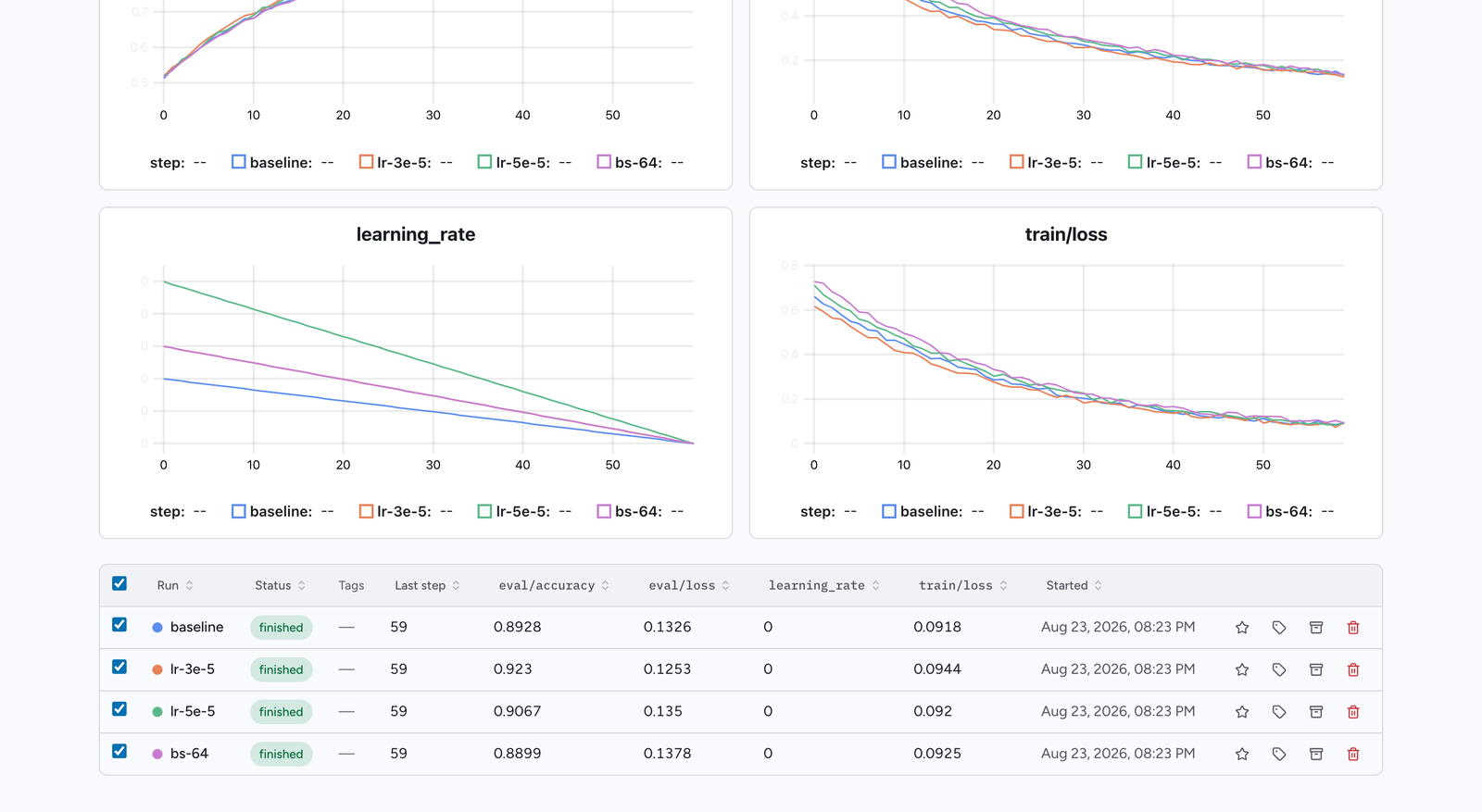
The run table shows each run's name, status, tags, last step, its summary metrics as columns, when
it started, and any checkpoints it produced. A Values switch above it chooses which summary of each
metric the dashboard uses: each run's Last value, its Min or Max over the run, or
Best — the minimum or maximum, whichever the metric's goal says is better (available once a goal
is set). The switch applies to the metric columns, their sorting, the metric filter, and the Scatter
and Parallel views below. Columns sort, groups fold into a single row, and a
metric filter narrows the list to runs matching a threshold (for example eval/accuracy > 0.9).
The first five runs are selected when the page opens; the checkboxes control what the views below
plot. An Export table CSV button downloads the table as-is — a folded group still exports
every member, not just its header row, so the file always matches what the current filters
selected rather than what happens to be visible. Each metric
is exported three times: its last value under its own name, then min:<metric> and
max:<metric>. The Metrics view (below) has its own
Export metrics CSV button, on both the project dashboard and a single run's page.
Each metric column header carries a goal marker — an arrow pointing down for "lower is better" or up for "higher is better". With write access, clicking it (or the faint target icon on a metric with no goal yet) sets the metric's goal — Lower is better, Higher is better or No goal — for everyone reading the project; once a metric has a goal, a trophy marks the run holding its best value among the runs that are not archived. See Metric goals and the best run for the same thing from the command line.
A Notes section on the project page shows the project's notebook (below), rendered as Markdown. With write access you can write or edit it in place; if someone else saved in the meantime, your save is refused rather than overwriting theirs, and your draft is kept for you to copy.
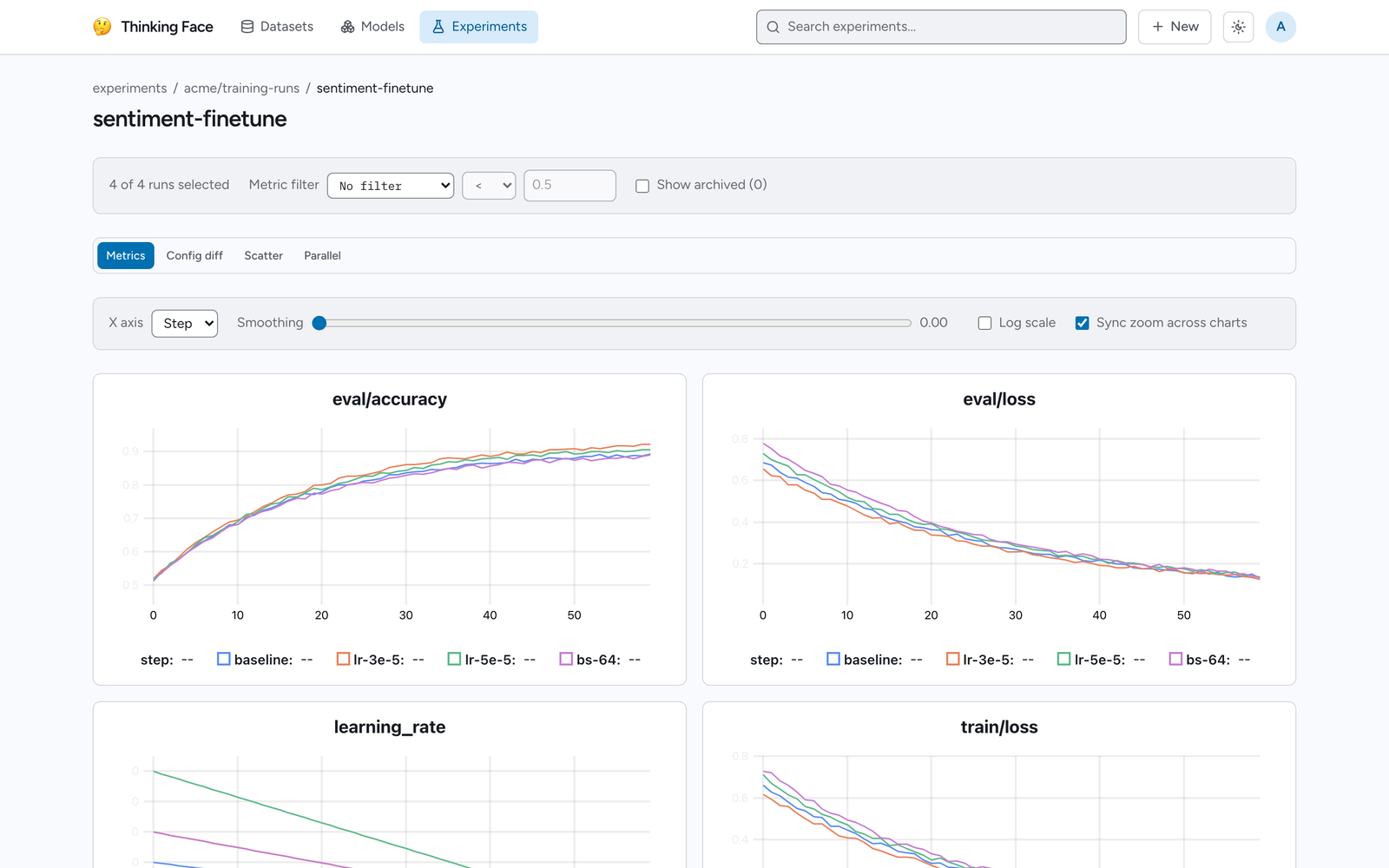
Four views sit under the table:
- Metrics — one chart per metric name, with every selected run overlaid. The X axis switches between step and wall-clock time, smoothing and a log scale are available, and zoom can be synchronised across all charts. System metrics get their own tab.
- Config diff — a table of hyperparameters across the selected runs, with a "differences only"
toggle.
_metaand_argsare excluded unless you ask for them. - Scatter — any numeric hyperparameter or metric against any other.
- Parallel — parallel coordinates across the selected runs, for reading a sweep axis by axis. Text hyperparameters are spaced evenly along their axis.
The run page
Clicking a run opens its own page, which carries, in order: a summary of each metric (its last
value, with the minimum and maximum it reached), that run's charts, its artifacts, the models it
produced, a free-form Markdown note, its hyperparameters, the TrainingArguments if a Trainer logged
them, and the environment snapshot. For a run that is running or stale, the header also shows
when it was last seen, with a hint explaining how long the run may stay silent before it is
marked stale.
Annotate and clean up runs
These need write access to the backing dataset repository, and are shared state rather than a per-viewer preference:
- Tags — free-form labels, up to 32 per run. The dashboard filters by them.
- Baseline — marks one run as the reference. The charts label it as such, so it is identifiable when several runs are overlaid.
- Archive — hides a run from the table without deleting anything. Reversible, and archived runs can be shown again with a checkbox.
- Note — Markdown prose about what the run was for and what it showed.
- Delete — removes the run and every metric point still held for it, irreversibly.
Warning
Deleting a run does not rewrite git history. A run whose points came from a Parquet export reappears the next time that export is indexed — the export is that path's source of truth. Deleting the repository is the way to remove those for good.
Work with runs from the command line
Everything the dashboard shows is also available from the tf CLI, which is how a script — or an
AI agent driving your training runs, see Using thinkingface from AI agents — reads
results without a browser. REPO is the experiment repository as ns/name; tf exp is an alias of
tf experiments. Every command takes --json for machine-readable output (the API's response,
unchanged). Reads need no token on an instance that allows anonymous reads; the commands that change
something need a write token. The full flag list is in the tf CLI reference.
Metric goals and the best run
A metric goal says which direction is better for a metric. Set goals once per project — before the first run if you like:
tf experiments goals alice/trackio-metrics ocr val/CER=min eval/accuracy=max
tf experiments goals alice/trackio-metrics ocr            # print the current goals
tf experiments goals alice/trackio-metrics ocr old_metric=none   # remove one
Goals not mentioned are left alone. With a goal in place, the run table and the dashboard mark the
best run of that metric — the lowest minimum for min, the highest maximum for max, among runs
that are not archived — and best:<metric> becomes a sort key.
List and sort runs
tf experiments runs alice/trackio-metrics ocr --sort best:val/CER --limit 5
tf experiments runs alice/trackio-metrics ocr --status running --status stale
tf experiments runs alice/trackio-metrics ocr --group lr-sweep --sort config:optimizer.lr \
    --columns config:optimizer.lr,min:val/CER,last:train/loss
tf experiments runs alice/trackio-metrics ocr --sort min:val/CER --json
Filtering and sorting happen on the server:
| Flag | Meaning |
|---|---|
--group G |
runs of sweep group G (repeatable: any of) |
--status S |
running, finished, failed or stale (repeatable: any of) |
--tag T |
runs carrying tag T (repeatable: all of) |
--archived true\|false |
only archived / only unarchived runs (default: both) |
--sort SPEC |
name, started_at, updated_at, last_step, last:<metric>, min:<metric>, max:<metric>, best:<metric> (needs a goal), config:<dotted.key> |
--order asc\|desc |
default asc; best: always puts the best run first |
--limit N |
at most N runs (1–1000) |
--columns LIST |
extra columns: config:<key>, last:<metric>, min:<metric>, max:<metric>, best:<metric>, group, job_type, tags, points, note |
Runs that lack the sort value always come last. Without --columns, the table shows every metric
with a goal in its goal's direction, then the last value of up to three other metrics, and a *
marks the best run of each goal metric. tf experiments run REPO PROJECT RUN prints one run in full:
status, step and point count, timestamps, tags, note, the flattened config, and the last / min /
max of every metric.
Compare configs
tf experiments diff alice/trackio-metrics ocr                 # every non-archived run
tf experiments diff alice/trackio-metrics ocr lr-0.01 lr-0.03 # just these
Configs are flattened to dotted paths and only the keys whose value differs (or that a run lacks,
shown as -) are listed. The _meta environment snapshot and the _resume bookkeeping are left
out unless you pass --include-meta.
Wait for a run
tf experiments wait blocks until a run satisfies a condition, which makes "start training, then
act on the result" scriptable:
tf experiments wait alice/trackio-metrics ocr lr-0.03                       # until it stops running
tf experiments wait alice/trackio-metrics ocr lr-0.03 --until 'step>=12000'
tf experiments wait alice/trackio-metrics ocr lr-0.03 \
    --until 'min:val/CER < 0.05 and step >= 1000' --timeout 6h --json
The condition (--until, default status!=running) is one or more comparisons joined by and /
or (and binds tighter; parentheses group):
| Field | Compares |
|---|---|
step |
the last logged step |
points |
the number of logged points |
status |
running, finished, failed or stale, with == / != only |
metric:<name> (or last:<name>) |
the metric's last value |
min:<name> / max:<name> |
the smallest / largest value it reached so far |
The operators are ==, !=, >=, <=, > and <. Quote a metric name that contains spaces,
parentheses, quotes or = ! < > right after the colon: metric:"val loss" < 0.2. A comparison on a
metric the run has not logged yet is false. A condition that does not parse is a usage error, with
a caret under the offending column.
| Exit code | Meaning |
|---|---|
0 |
the condition holds |
1 |
the timeout passed (--timeout, default 24h, 0 for never), or the run stopped without meeting the condition |
2 |
usage error, including an --until that does not parse |
The last state of the run is printed in every case but a usage error; with --json it is
{"run": {...}, "met": true|false, "reason": "met"|"timeout"|"stopped", "until": "..."}.
- The run does not have to exist yet. A run that is not found is retried every 5 seconds, so you can start waiting right after launching the job, before it has logged anything.
- A run that stops ends the wait. When the run is no longer
running— finished, failed, or stale because the job crashed — and the condition neither holds nor mentionsstatus, it can no longer become true, so the wait exits 1 with reasonstoppedinstead of hanging until the timeout. Waiting forstep>=12000on a job that died at step 5000 returns about two minutes after the crash, once heartbeats stop.--ignore-stalekeeps waiting instead (a stale run can come back, and a finished one can be resumed). - The wait uses the server's long poll, so it reacts within a second or two of a new batch without hammering the server.
Keep project notes
Each project has a notebook: {project}/NOTES.md on the repository's default branch, so it is
versioned with the metrics and comes down with git clone. The project page shows it; the CLI reads
and writes it:
tf experiments notes alice/trackio-metrics ocr > NOTES.md     # print (nothing if there are none yet)
$EDITOR NOTES.md
tf experiments notes alice/trackio-metrics ocr --set NOTES.md -m "notes: lr sweep results"
A link written as [text](run:<run name>) — for example [best so far](run:lr-0.03) — becomes a
link to that run in the web UI.
--set never overwrites blindly: it reads the current version first and the server refuses the
write (exit 1) if the notes changed in between. For a read-edit-write spread over two invocations,
read with --json and pass its blob_sha back with --base-sha (--base-sha "" means "the notes
must not exist yet"); --force overwrites whatever is there.
Annotate runs
tf experiments annotate changes a run's hand-maintained metadata — the same note, tags and
archived flag the run page edits. Only what a flag names changes:
tf experiments annotate alice/trackio-metrics ocr lr-0.03 --note "Best CER so far; diverges after 20k steps."
tf experiments annotate alice/trackio-metrics ocr lr-0.03 --add-tag keep --remove-tag wip
tf experiments annotate alice/trackio-metrics ocr lr-0.10 --archive
--note-file FILE (or - for stdin) sets the note from a file, --tag T (repeatable) replaces the
whole tag set, --clear-tags removes every tag, and --unarchive shows an archived run again.
Where the data actually lives
Points from the real-time ingest API land in the database first, which is what makes the chart
live. That buffer is not the source of truth. A background worker polls every 10 seconds and
writes the buffer into the dataset repository's Parquet — after TF_EXP_FLUSH_INTERVAL has
elapsed (one minute by default), and immediately when a run reaches finished or failed.
The flush writes to the same file route A does: the metrics.parquet already detected for that
project, or {project}/metrics.parquet if there is none yet. Columns are run_name, step,
timestamp, plus one per metric. The commit is made server-side and signed as thinkingface,
with the message chore(trackio): flush {project} metrics, so git log makes it obvious nobody
typed it. Because *.parquet is LFS-tracked by default, the payload goes to object storage and an
LFS pointer is committed.
A newly created experiment repository therefore shows up in the Experiments list once its first
flush lands — within a minute for a live run, or right away if you gave its README card a
trackio tag.
The practical consequence: your experiment data comes down with git clone, can be read straight
out of the bucket with the gcloud storage cp script the repository page generates, and can be
queried with DuckDB without the server involved. See Downloading Files for both
routes.
Two points are also worth knowing about how charts read that file:
- During a flush the same point briefly exists in both git and the database. It is de-duplicated
by an internal
_ingest_idcolumn, so the chart is never doubled and never missing a point, no matter when you look. - Two genuinely different values logged at the same step — from a resume, or from logging a step twice — are both kept in the Parquet. The chart draws whichever was logged later.
A flush rebuilds the target metrics.parquet in memory (there's no way to append a row group to
an existing file today), so there's a ceiling on how large that file can grow and still be
flushed: 1,000,000 existing rows. This is a project-wide ceiling shared by every run writing to
that project's metrics.parquet, not a per-run one, and no realistic single training run
reaches it on its own — it matters mainly for a project accumulating a very long history of
runs.
Past that ceiling, no data is lost. The project's still-unflushed points stay buffered in
the database (the live chart keeps reading them from there, so nothing disappears from the UI
either) and a flush is retried automatically about once an hour, rather than writing a
truncated file or discarding the points that couldn't be written. The retry keeps failing until
the underlying condition changes — the file shrinking back under the ceiling, most likely by
deleting some of the runs that contributed to it — so this is something an operator needs to
notice and act on, not something that resolves itself. Today that means watching the server
logs for the error experiment project cannot be flushed; its buffered points are being kept,
which names the project; there is no dedicated CLI or UI surface for it yet.
Related pages
- Uploading Files — pushing the dataset repository the runs live in
- Downloading Files — pulling the Parquet back out, and reading it from the bucket
- Viewing Datasets — browsing that Parquet as a table in the browser
- Authentication — issuing the write-scoped token ingest needs
- Using thinkingface from AI agents — the MCP server and the agent loop built on the commands above
- tf CLI — every
tf experimentsflag - Organizations — sharing an experiment repository with a team